Linella: The Script Font That Balances Elegance and Readability
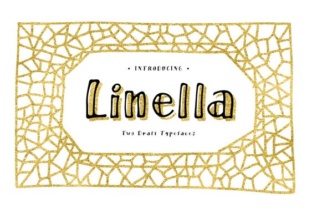
If you’ve spent any time browsing for fonts with personality, you’ve likely come across Linella – a typeface from the foundry Blessed Print that manages to feel both hand-lettered and polished. In a market flooded with generic scripts, Linella stands out because it doesn’t force you to choose between beauty and function. Whether you’re designing a wedding invitation, building a brand identity, or creating content for social media, this font offers something rare: it looks like it was written by a skilled calligrapher, yet it remains legible at sizes where most scripts turn into illegible squiggles.
What Makes Linella Different
The first thing you notice about Linella is its organic rhythm. The strokes vary naturally – thick where a brush would press down, thin where it lifts – giving each letter a hand-drawn authenticity that software-generated scripts often lack. Blessed Print designed the font with a wide set of ligatures and stylistic alternates, so you can avoid the “canned” look that plagues many script typefaces. When you enable OpenType features in your design software, Linella automatically substitutes alternate glyphs for common letter combinations, creating the impression that every word was written by hand.
Another key characteristic is its legibility. Many script fonts sacrifice readability for flourish: the letters run together, descenders tangle with ascenders on the next line, and the overall texture becomes a blur. Linella sidesteps this by maintaining generous counter spaces (the openings inside letters like “o” and “e”) and keeping the slant consistent but not exaggerated. Even at body text sizes – say, 12 to 14 points – the font remains comfortable to read, which is rare for a script outside of formal invitation work.
Where Linella Shines
Because Linella balances elegance with clarity, it adapts to a wide range of contexts. Here are some of the most effective uses I’ve observed from clients, colleagues, and my own projects.
Branding and Logo Design
Small businesses and lifestyle brands have embraced Linella for its ability to convey warmth without looking childish. A coffee shop, a boutique skincare line, or a freelance creative studio can use Linella in their logo to signal craftsmanship and personal attention. The font’s alternates let you tailor a wordmark so it feels unique – no two logos need to look exactly alike. Pair it with a clean sans-serif like Montserrat or Open Sans for contrast, and you have a brand identity that feels both approachable and professional.
Wedding and Event Stationery
This is where Linella naturally excels. Invitations, place cards, thank-you notes, and signage all benefit from a script that reads well from a distance yet stays intimate up close. The font’s graceful swashes (available as stylistic sets) can be used to highlight the couple’s names or key details, but because the base glyphs are restrained, the overall design never feels overdone. For non-wedding events – anniversaries, baby showers, or corporate galas – Linella adds a touch of human warmth that clean sans-serifs can’t deliver.
Social Media and Digital Content
In a crowded feed, typography is often the difference between a scroll-past and a double-tap. Linella works well for quote graphics, promotional posts, and Instagram stories because it has high contrast without being fussy. The letterforms hold up even when rendered at small sizes on mobile screens. I’ve used it for blog post title cards and found that engagement improved simply because the font looked more personal than the default system scripts. Just be mindful of contrast: a light version on a dark background can lose some of the stroke variation, so test it in your actual posting environment.
Publishing and Editorial
While you wouldn’t set a 500-page novel in a script font, Linella is an excellent choice for chapter headings, pull quotes, and introductory paragraphs. Its readability at medium sizes means you can use it for short runs of body text in magazines, lookbooks, or promotional materials. For example, a lifestyle magazine might use Linella for the opening statement of a feature article – the font immediately signals that the content is personal and narrative-driven, not just informational.
Educational Materials
Teachers and educators often need materials that are engaging yet clear. Linella can be used for worksheet titles, classroom labels, or certificate templates. Its friendly character helps lower the barrier for younger readers while still looking polished enough for high school or adult education contexts. Because it’s available with multiple weights (regular, bold, etc.), you can create a clear hierarchy without mixing in a different font family.
Why Linella Works for Professionals
From a practical standpoint, Linella saves time. Instead of commissioning custom lettering or spending hours tweaking a digital brush, you can purchase a license from Blessed Print and have a quality script ready in minutes. The .otf file includes all the alternates and ligatures you need, so you can achieve a bespoke look without hiring a lettering artist. For entrepreneurs and freelancers working on tight budgets, this alone makes Linella a smart investment.
The font also improves user experience in digital products. When used for buttons, headings, or short text blocks in an app or website, it adds a human touch that can reduce the sterile feel of many interfaces. However – and this is important – scripts should be used sparingly in UI. Linella works best for hero sections, call-to-action highlights, or brand-specific elements, not for navigation menus or long paragraphs. When you place it thoughtfully, it boosts engagement and conveys personality without sacrificing usability.
Choosing and Using Linella: Practical Tips
Not every project is a good fit for Linella, and even when it is, you need to apply it with care. Here are guidelines I’ve developed through trial and error:
- Mind the spacing. Linella’s default letter spacing is tight, which can cause descenders to collide with the line below. Increase the line height in your design software – 1.4 to 1.6 times the font size is a safe starting point. For word spacing, sometimes you need to nudge it open a little to keep the hand-lettered feel from looking cramped.
- Pair it strategically. Linella pairs best with simple, neutral fonts. A classic sans-serif like Lato or a clean serif like Source Serif Pro will let the script take center stage. Avoid pairing it with another ornamental typeface – that usually creates visual noise.
- Use alternates deliberately. If you want a consistent look across a logo, choose your favorite alternate glyphs and stick with them. For invitation text, let the automatic ligatures do the work – they’re well designed and will keep the rhythm natural.
- Test at your final output size. A script font that shines on a poster may become muddy on a business card. Print a mockup or use a preview tool at the actual dimensions before finalizing your design. Linella holds up well, but every font has its limits.
- Check licensing. Blessed Print offers standard desktop licenses, web licenses, and often an app license. If you’re using Linella in a logo for a client, make sure the license covers commercial use. If you’re embedding it in a website, the web font license is necessary. Always read the fine print.
Getting Started with Linella
You can purchase Linella directly from the Blessed Print website. The foundry is known for quality typefaces with extensive character sets, and Linella is no exception: it includes support for Western European languages, multiple numeral styles, and punctuation that matches the script’s tone. After downloading, install the font as you would any .otf or .ttf file, then open your design software (Adobe Illustrator, Canva, Affinity Designer, or even Microsoft Word for limited use). Enable the OpenType features from the character panel to access the alternate glyphs.
If you’re new to using script fonts with alternates, watch a quick tutorial specific to your software. Most design tools now have built-in panels for OpenType that let you see all available variants – you can cycle through them until you find the right combination for your project. It’s a small effort that pays off in professional-looking results.
Linella isn’t the only script font out there, but it fills a specific niche: it’s personable without being fussy, decorative without being illegible. For anyone who communicates visually – whether you’re a marketer designing a campaign, a teacher creating classroom materials, or a bride planning your invites – this typeface can elevate your work while keeping it accessible. Try it on a project that needs a human touch, and you’ll quickly see why Blessed Print’s Linella has become a go-to for designers who need both style and substance.