CrossHat Font by Gblack Id: A Practical Look at Its Design and Fit for Your Projects
When choosing a typeface, the decision often comes down to more than aesthetics. You need a font that communicates the right tone, works across different media, and supports the content you are producing. CrossHat, designed by Gblack Id, is a distinctive typeface that has been gaining attention for its unique character and practical punctuation set. But how does it compare to other options? And when should you consider it over more conventional fonts?
This article explores what makes CrossHat different, where it fits best, and what tradeoffs you should weigh before using it in your next project.
What Is CrossHat and What Sets It Apart
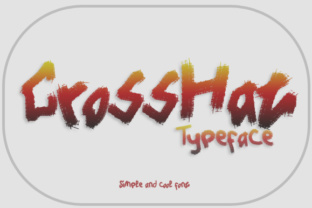
CrossHat is a display-oriented typeface from designer Gblack Id. At first glance, its most noticeable feature is a structured, crosshatched pattern that gives letterforms a textured, almost woven appearance. This is not a font designed for long-form body text. Instead, it excels in contexts where you want letters to carry visual weight and texture on their own.
The font includes basic punctuation, which makes it more functional than many highly decorative typefaces that omit symbols or only include minimal glyphs. For designers and content creators who need a headline font that still supports standard sentence structure, this attention to punctuation matters. You can use CrossHat in titles, banners, posters, and branding elements without having to switch to another font just to include a comma, period, or quotation mark.
The design language of CrossHat leans into a handcrafted, slightly industrial feel. The crosshatch strokes create a sense of depth and layering, which can make text stand out against both light and dark backgrounds. This effect is difficult to achieve with standard sans-serif or serif fonts without adding extra effects or filters.
How CrossHat Compares with Similar Typefaces
To understand whether CrossHat is right for your work, it helps to place it alongside other typefaces that serve a similar purpose. Display fonts with texture, pattern, or ornamentation are not new, but they vary widely in readability, file size, and adaptability.
Textured Display Fonts
Many textured display fonts rely on rough edges, grunge effects, or irregular stroke widths. CrossHat takes a different approach. Its crosshatch pattern is more regular and geometric, which gives it a controlled, intentional feel. Compared to a distressed or weathered font, CrossHat feels cleaner and more structured. If you are working on a project that needs texture without looking worn or damaged, this font is a strong candidate.
Pattern-Based Fonts with Punctuation
Some pattern-based fonts treat punctuation as an afterthought. You may find yourself missing a colon or an exclamation mark when you need it. CrossHat includes basic punctuation, which is a practical advantage. For projects that require headlines with full sentences or questions, this makes the font more versatile than many alternatives in the same stylistic category.
Minimalist and Sans-Serif Headline Fonts
On the other end of the spectrum, minimalist sans-serif fonts offer maximum readability but minimal character. CrossHat provides the opposite tradeoff. You gain a strong visual identity, but you lose some legibility at smaller sizes or in dense layouts. If your project prioritizes brand recognition or visual impact over quick scanning, CrossHat may serve you better than a neutral headline font.
Strengths of CrossHat That Stand Out
Several qualities make CrossHat worth considering, especially for specific use cases.
- Distinct visual texture: The crosshatch effect is immediately recognizable. It adds depth and craftsmanship to text without requiring additional graphic effects.
- Basic punctuation support: This may sound minor, but it makes the font functional for real-world headlines and short copy. You are not forced to omit punctuation or manually create symbols.
- Works well in large sizes: CrossHat is built for display use. At 36 points and above, the pattern becomes clear and the letters feel substantial.
- Pairs with simple backgrounds: Because the font already carries visual complexity, it pairs naturally with clean, minimal layouts. A solid background or a simple gradient lets the letters do the work.
Tradeoffs and Limitations You Should Know
No font works for every situation, and CrossHat has clear boundaries that affect where it fits.
Lower Legibility at Small Sizes
The crosshatch pattern can become muddy or hard to read when the font is scaled down. If you need to use CrossHat in subheadings or small captions, test it at the actual size first. At 18 points or below, the texture may overwhelm the letter shapes, especially on screens with lower resolution.
Limited Weight and Style Options
Compared to large font families that offer multiple weights, italics, or condensed versions, CrossHat is more limited. You have fewer choices for variation within the same typeface. This means you may need to pair it with a secondary font for body text or for other roles in your design. Relying on CrossHat alone can lead to a lack of contrast in your typographic hierarchy.
Not Ideal for Long Reading Passages
This font is not designed for extended reading. The texture that makes it interesting in headlines becomes fatiguing in longer paragraphs. If your project includes substantial body text, CrossHat is best reserved for headers, pull quotes, or decorative elements.
Pattern Sensitivity to Background and Color
The crosshatch effect relies on contrast. On very busy backgrounds, or in colors that are too close to each other, the pattern may lose definition. For best results, use CrossHat on solid, neutral backgrounds with enough contrast to let the texture remain visible.
When CrossHat Is the Right Choice
If you are evaluating whether to use CrossHat, consider project contexts where its strengths align with your goals.
- Branding for handcrafted or artisanal products: The woven, handmade feel of the font suits brands in craft food, textiles, ceramics, or other fields where texture and artistry matter.
- Poster and event design: For posters, flyers, or event titles that need to grab attention from a distance, the bold texture of CrossHat works effectively.
- Digital banners and social media graphics: In digital formats where text is large and concise, CrossHat adds a layer of visual interest that plain fonts cannot match.
- Merchandise and apparel: The pattern translates well to physical products like t-shirts, tote bags, or stickers, where the texture becomes part of the product design.
When You May Need a Different Option
There are also clear scenarios where CrossHat is not the best fit. Recognizing these will help you avoid forcing a font into a role it cannot fill.
- Long-form articles or reports: For body text, choose a highly readable serif or sans-serif font. CrossHat is not designed for this purpose, and using it will reduce readability.
- Corporate or formal documents: If the tone needs to be neutral, professional, or conservative, a more conventional font will communicate that tone more reliably.
- Small text or fine print: Legal disclaimers, captions, or footnotes require clarity at small sizes. CrossHat loses legibility when scaled down.
- High-density layouts: In layouts where multiple text elements compete for attention, the strong texture of CrossHat can create visual clutter. A simpler font may provide better balance.
Practical Examples of CrossHat in Use
To give you a clearer sense of how CrossHat performs, consider a few realistic scenarios.
Example 1: A poster for a local art fair.
The title reads "Annual Art Market" in CrossHat at 72 points on a white background. The crosshatch pattern gives the lettering a handcrafted quality that matches the event theme. Below the title, a sans-serif font lists date and location at 18 points. The contrast between the textured headline and the clean supporting text creates a clear hierarchy.
Example 2: A brand logo for a small-batch coffee roaster.
The brand name appears in CrossHat on kraft paper-colored backgrounds. The font's industrial texture aligns with the roaster's rustic, small-batch identity. The punctuation in the tagline, "Fresh. Local. Bold." works without breaking the visual style.
Example 3: A social media graphic for a workshop.
The headline uses CrossHat at 48 points with a dark background and white lettering. The pattern remains legible at this size, and the graphic stands out in a crowded feed. The body text, kept to a minimum, uses a simple sans-serif font to avoid competing with the headline.
Factors to Consider Before Choosing CrossHat
When deciding whether CrossHat fits your project, think about the following aspects.
- Scale: Will the font be used at large sizes where its texture can shine? If most of your text will be small, look elsewhere.
- Context: Does the project benefit from a handcrafted, textured look? If the brand or message is sleek, modern, or minimalist, CrossHat may feel out of place.
- Punctuation needs: If your headlines require full sentence structure, the font's basic punctuation set is a plus. If you need specialized symbols or accented characters, verify the glyph set first.
- Pairing strategy: Plan for a complementary body font. CrossHat works best when it is the accent, not the entire typographic system.
Making an Informed Decision
CrossHat by Gblack Id offers a distinct visual texture that stands apart from both minimalist display fonts and heavily distressed alternatives. Its inclusion of basic punctuation makes it more practical than many decorative fonts, and the crosshatch pattern provides a controlled, geometric texture that works well in large-scale applications.
At the same time, its limitations are clear. It is not built for body text, small sizes, or contexts that demand neutrality. The font requires intentional use and a thoughtful pairing strategy to reach its full potential.
If your project calls for a headline font that delivers texture, structure, and a handcrafted feel, CrossHat is worth adding to your consideration set. Test it at your intended size and on your actual background, and compare it with other display fonts that offer similar features. The decision ultimately depends on how well the font's personality matches your message, your medium, and the experience you want to create for your audience.