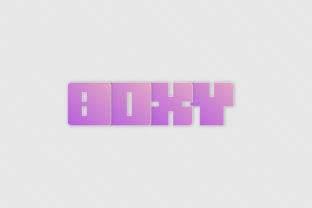
Boxy: A Square Display Font for Bold Visual Statements
If you’ve ever spent an afternoon hunting for a typeface that feels both modern and sturdy, you know the struggle. Most fonts lean either toward delicate elegance or neutral utility. But sometimes you need something that stands its ground, takes up space, and tells people you mean business. That’s where Boxy comes in. Designed by Simon Jakobssons, Boxy is a square display font built from sharp, geometric forms that feel almost architectural. It doesn’t whisper. It announces.
Whether you’re building a brand, designing a poster, or just experimenting with a personal project, Boxy gives you a tool that’s hard to ignore. Let’s walk through what this font actually does, where it fits best, and how different kinds of people are already putting it to work.
What Makes Boxy Different
At its heart, Boxy is a square display typeface. That means every character is constructed from straight lines and right angles, with minimal curves. The result is a look that’s blocky, consistent, and highly legible at larger sizes. This is not a font you’d use for a 10-page essay. It’s a font you use when you want every letter to feel like a deliberate mark.
Simon Jakobssons designed Boxy with a focus on modular structure. Each glyph fits within a square grid, which gives the whole alphabet a uniform, almost pixelated feel. But it’s not cold or robotic. The slight irregularities in stroke thickness and the carefully balanced negative space keep it from feeling like a computer generated afterthought. It has personality without trying too hard.
Because Boxy is a display font, it works best at larger point sizes. Think headlines, titles, logos, signs, or anything that needs to grab attention from a distance. It’s not built for body text. If you try to set a paragraph in Boxy at 12 points, it’ll feel cramped and hard to read. But bump it up to 48 or 72 points, and it transforms into a visual anchor.
Real Use Cases Across Different Scenarios
Where does Boxy actually shine? Let’s look at several realistic situations, each involving a different kind of person who might reach for this font.
Brand Identity and Logos
Imagine you’re a freelance graphic designer working with a new coffee shop. The owners want something that feels industrial, bold, and a little bit raw. They don’t want a curly script or a thin sans serif. They want letters that look like they were stamped onto a steel beam. That’s Boxy territory. Using Boxy for the logo allows you to create a mark that is immediately recognizable, even from across the street. Because each letterform is square and consistent, the logo scales down well on a business card and reads clearly on a storefront sign.
Small business owners often worry about looking amateurish. A strong, confident font like Boxy can elevate a simple wordmark without needing complex graphics. It signals that you’ve made deliberate choices. For a brewery, a woodworking shop, or a tech startup with a minimalist vibe, Boxy gives off a deliberate, handmade feel that customers trust.
Posters and Flyers
Let’s switch to an educator planning a campus event. You need a poster that stands out on a crowded bulletin board among dozens of other announcements. Standard fonts like Arial or Times New Roman get lost. But a poster that uses Boxy for the event title, paired with a simple sans-serif body font, immediately draws the eye. The blocky letters demand attention, especially when you combine them with bright colors or high contrast backgrounds.
For a music festival flyer, Boxy works well for headliner names. Pair it with a textured background or a rough paper texture, and the font feels gritty and loud. If you’re a hobbyist designing a poster for a local theater production, Boxy can give your title the weight it needs to compete with other promotional material.
Social Media Graphics
Marketers and content creators live and die by thumb-stopping visuals. On Instagram or LinkedIn, you have a split second to make someone pause their scroll. A Boxy headline on a simple background can do exactly that. Because the font is so geometric, it creates a strong visual frame. Even without an image, the text itself becomes the graphic.
For example, a lifestyle blogger announcing a new series of posts could create a square graphic with a single word like “MINIMAL” in Boxy, followed by a short description in a lighter font. The contrast between the heavy, squared title and the softer body text creates a professional look without requiring advanced design skills. If you’re a freelancer promoting your services on social media, using Boxy for your key offerings (e.g., “COPYWRITING,” “DESIGN,” “STRATEGY”) gives your posts a clean, authoritative feel.
Merchandise and Apparel
Entrepreneurs who sell T-shirts, hoodies, or tote bags often struggle with typography. A font that looks great on screen might not transfer well to fabric or screen printing. Boxy, with its thick consistent strokes, prints cleanly. Each letter holds its shape even when printed small on a tag or large across the back of a shirt.
Say you run a small online store selling motivational merchandise. A phrase like “KEEP GOING” set in Boxy becomes a bold statement piece. The geometric forms reinforce the message of stability and strength. Customers who buy the shirt aren’t just getting a phrase; they’re wearing an attitude. And because the font is distinct, it becomes part of your brand identity across different products.
Digital Interfaces and Apps
While Boxy isn’t designed for long-form body text, it works well as a display element in user interfaces. Think mobile app loading screens, onboarding headers, or feature callout titles. A startup building a productivity tool could use Boxy for the app name on the splash screen, creating a memorable first impression. The squareness suggests order and efficiency, which aligns perfectly with a tool that helps users organize their tasks.
For a game developer creating a retro or grid-based aesthetic, Boxy can be the primary typeface for menus and level titles. It reinforces the digital, blocky world you’re immersing players in. The font’s modular nature even hints at pixel art without actually being pixelated.
Who Benefits Most from Using Boxy
Different users will find different value in this font. Let’s break it down by role.
Graphic designers benefit from Boxy’s distinctive look when they need to break away from overused display fonts. It gives them a fresh tool for creating contrast in layouts. Because it’s a single weight (no extensive family), it forces designers to rely on layout, color, and spacing for hierarchy, which often leads to cleaner compositions.
Small business owners get a font that helps them look established without hiring a full branding agency. A simple wordmark in Boxy can be the start of a consistent visual identity. They can use it across business cards, website headers, and packaging.
Content creators and bloggers can use Boxy to create consistent thumbnail templates, quote cards, and social media banners. The font’s personality helps them stand out in a crowded feed. Even if they don’t have a graphic design background, the simplicity of Boxy makes it easy to work with.
Educators and event organizers benefit from Boxy’s high legibility at large sizes. Posters, banners, and slides become more impactful. Students or attendees are more likely to read the information when it’s presented in a bold, clean font.
Hobbyists and makers who enjoy DIY design, such as zine creators or album cover artists, find Boxy perfect for projects that need a strong typographic element. It works well with experimental layouts, cut-out letters, or mixed with hand-drawn elements.
What to Consider Before Using Boxy
No font is a magic bullet. Before you download Boxy and set it as your new default headline font, think about a few practical details.
Use it sparingly. Because Boxy is very distinctive, it can overwhelm a design if used too much. Limit it to titles, subtitles, or short phrases. Let it do the heavy lifting, then let a neutral secondary font carry the rest of the content.
Mind the spacing. Boxy’s square forms can create tight letter spacing if you don’t adjust kerning manually. When using it for logos or headlines, play with the tracking. Sometimes a little extra space between letters makes the font feel more legible and less cluttered.
Consider your audience. If you’re designing for a very traditional or formal industry (law, finance, healthcare), Boxy might feel too edgy or casual. It works best in creative, industrial, or tech-related contexts. Know your brand’s voice before committing.
Check licensing. Always verify the license terms for Boxy before using it in commercial projects. Some free fonts come with restrictions on embedding in apps or using in merchandise. Simon Jakobssons may offer Boxy under specific terms, so read the fine print.
Test at different sizes. What looks great at 100 points may lose its appeal at 24 points. Print a sample at the actual size you plan to use. Notice how the counters (the enclosed spaces inside letters like “A” or “O”) hold up. Boxy’s counters are generous, but it’s still worth checking.
Final Observations on a Square Approach
Boxy isn’t trying to be everything to everyone. It’s a focused tool with a clear personality. That focus is exactly what makes it valuable. In a world where designers have access to thousands of fonts, the ones that succeed are those that help you make a clear statement without a lot of fuss. Boxy does that by committing to its square structure and letting you fill in the rest.
When you use Boxy, you’re not just picking a typeface. You’re choosing to communicate with boldness, clarity, and a touch of structural honesty. Whether you’re launching a brand, promoting an event, or crafting a piece of art, Boxy gives your words the frame they need to stand out—literally and figuratively.